Friday, 20 November 2015

What is Credential Manager in Windows 10

What is Credential Manager in Windows 10
Credential Manager Command Line


जब आप, आपके computer से network मे किसी भी resource, computer or website को access करते हो तो  Windows credential manager आपके username and password को सेव करता है | बाद मे जब आप उन resources को वापस access करते है तो आपको आपके credential नहीं देने होते एवं windows, credential manager मे save username and password को use करके आपको authenticate करता है | credentials स्पेशल folders मे save होते है जिनको की vaults कहा जाता है | बाद मे अगर आप किसी भी network resource का username and password change करते है तो आपको credential manager मे भी specific vault मे जा कर पासवर्ड change करना पड़ सकता है otherwise window automatic login will not work for that resource. 

You can access "Windows Credential Manger" from - 

Click Start - Type credential manager and select from the list or go to control panel and search credential manager. 

credential manager
credential manager dialog box

You can use command to open "credential manager" box - 

Open a command prompt, or enter the following in the run command -  rundll32.exe keymgr.dll,KRShowKeyMgr
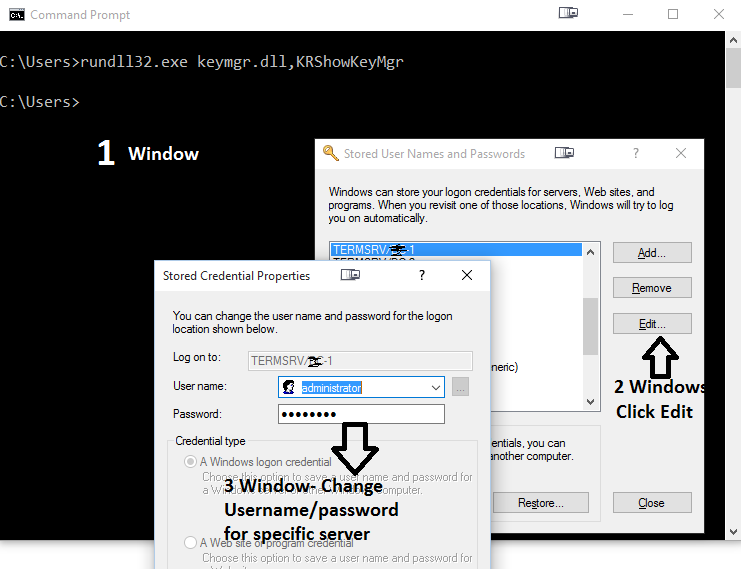
credential manager command line


Thursday, 19 November 2015

Remove or Hide Blogger Navbar Topbar or Titlebar

How to remove or Disable blogger Top Bar / Navbar

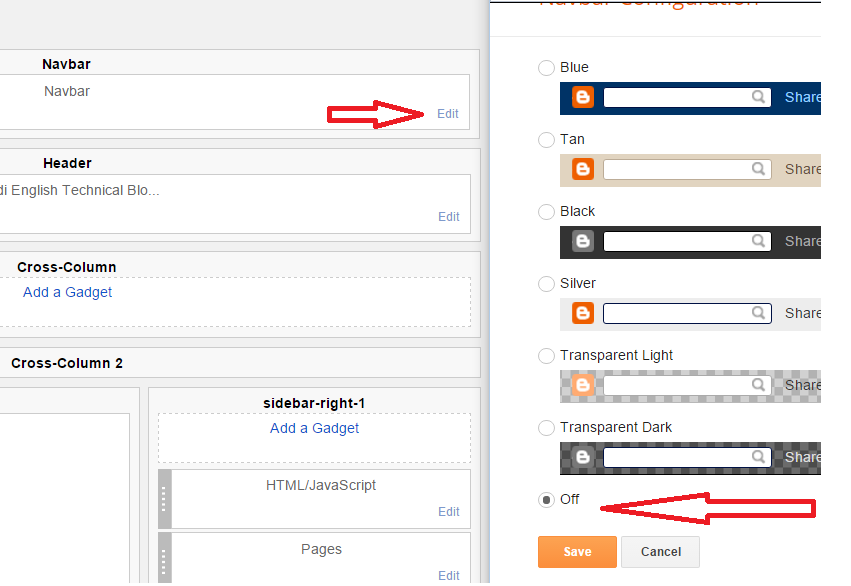
Every Blogger has default gadgets and one of them is Navbar on top. You can control these gadgets from Layout tab. Follow steps to disable, remove or choose another Navbar on your blog. 

Step 1- Login your Blog and go to "Layout" Tab 


Step 2 - On the NavBar, Click Edit. this will pop up Navbar window with different options. Scroll down and choose "Off" to disable Navbar from your blog. 


This is all. It will remove Navbar from your blog. Later on if required you can follow above steps and enable it.


How to enable or disable Hibernate in Windows 10

Disable hibernate in windows 10

You can ON or OFF hibernate in windows 10 using command:- 

Step 1 - Click Start (windows logo) and select "Command Prompt" as admin - To do right click on the "command prompt" and select "Run as administrator"

Or 

Press Windows + X keys to open menu and select Command Prompt (Admin) option - See below 

Windows + X key in windows 10

Step 2 - On the Command Prompt Type - powercfg /h ON - It will enable hibernate on your machine

Step 3 - On the Command Prompt Type - powercfg /h off - It will disable hibernate on your machine

See Screen shot below - 

enable or disable Hibernate in Windows 10
Enable or Disable Hibernate in Windows 10

Wednesday, 18 November 2015

What is Port in Networking - In Hindi

Definition of Port in Networking - In Hindi 
Type of Ports in Networking
What is the use of Port Number

Computers and Networking की टर्म मे ports को mainly दो categories मे divide किया जा सकता है - Physical ports and Logical Ports

Physical ports computer or networking devices मे एक physical इंटरफ़ेस होता है जो की किसी डिवाइस से physically कनेक्ट करने के लिए काम मे आता है | कोई भी computer या networking devices मे बहुत तरह के ports होते है जिसमे कुछ internal ports हो सकते है जो की कंप्यूटर मे internal parts को connect करने मे काम मे आते है जैसे की disk drive, display card आदि | इसी तरह से कंप्यूटर मे कुछ external पोर्ट्स भी हो सकते है जो की computer / network devices मे outside की तरफ physically expose होते है and outside devices को connect करने के लिए काम मे आते है जैसे की प्रिंटर्स पोर्ट, Mic और external drive etc. 

Logical ports को software communication ports भी कहते है जो specific प्रोसेस एवं type of service को identify करती है | किसी भी communication session का origination एंड destination address तभी complete होता है जब पोर्ट के साथ host का IP address एवं communication protocol associate हो | 

Port Numbers :- एक port number 16-bit का  होता है जिसकी range 0 से 65535 होती है | Specific port number किसी भी specific service को identify करने के लिए काम मे आती है | हज़ारो ports मे से 1024 well known ports को convention ने hosts पर specific services type identify करने  के लिए रिज़र्व किया हुआ है | पोर्ट्स primarily used by Transport Layer protocols of Internet Protocol suite, such as User Diagram Protocol (UDP) and Transmission Control Protocol (TCP).

Example of Port Number - Port 80 is used for HTTP traffic. 

Popular ports - 

21: File Transfer Protocol (FTP)
22: Secure Shell (SSH)
23: Telnet remote login service
25: Simple Mail Transfer Protocol (SMTP)
80: HTTP used in the World Wide Web
110: Post Office Protocol (POP3)
143: Internet Message Access Protocol (IMAP)
161: Simple Network Management Protocol (SNMP)
443: HTTP Secure (HTTPS)
465: SMTP Secure (SMTPS)

Default userName and Password Dlink DI-624 Models

What is the default User Name and password for DI-624 Series Routers and Modem?

Dlink D-624 has many models and all have same user name and password - 

Dlink - DI-624, DU-624+, DI-624M, DI-624S, DI-624V2, DI-624V3, DI-624V5

Default User name and Password for all (above model) is admin / blank (no password)


Differences between basic disk and dynamic disk storage - In Hindi

What Are Basic and Dynamic Disks and explain difference between Basic and Dynamic hard disk in windows


Windows मे hard disk के दो पॉपुलर configuration है - Basic Disk and Dynamic Disk | इनमे से Basic Disk सबसे ज्यादा popular एंड use में आने वाल configuration है क्योकि यह easy to manage है | Advanced users and professionals जो की multiple हार्ड disk use करते है एवं dynamic disk के benefits को जानते है वो Dynamic Disk configuration use करते है | 

Basic Disk का concept जब DOS introduce हुआ था तब से है जबकि Dynamic configuration windows 2000 के साथ launch हुआ था | 

Basic Disk - बेसिक डिस्क मे डिस्क के सभी partition को manage करने के लिए partition table होती है एवं इसको DOS के साथ साथ Windows के सभी versions support करते है | एक disk मे जब भी कोई OS installation होता है तो उस disk का default configuration बेसिक डिस्क type होता है | एक बेसिक डिस्क मे basic volume होता है जैसे की primary partition, extended partition, logical partition (extended partition मे ही सारे logical partition होते है). Basic disk को डायनामिक डिस्क मे easily convert किया जा सकता है | Basic Disk मे एक बार partition क्रिएट करने के बाद इसकी capacity change नहीं कर सकते (unless to use third party tools)| बेसिक डिस्क मे partition (volume) की maximum capacity 2 TB तक ही सकती है एवं एक basic disk मे ज्यादा से ज्यादा 4 primary partition हो सकते है |

Dynamic Disk - Dynamic Disk मे partition को manage करने के लिए partition table की जगह पर hidden database (LDM) होता है | LDM सभी dynamic volume or dynamic partition की इनफार्मेशन को track एंड manage करता है | Dynamic Disk मे आप volume create कर सकते है जो की multiple disk रख सकता है जैसे की spanned and striped volume, इसके अलावा आप fault-tolerant volumes भी बना सकते है जैसे mirrored volumes and RAID 5 volumes. डायनामिक डिस्क मे restart एवं data loose किये बिना ही किसी भी volume की capacity increase की जा सकती है | डायनामिक डिस्क 2 TB से large partition को मैनेज कर सकते है एवं इसमे अनलिमिटेड पार्टीशन create किये जा सकते है 


What is Telnet and how telnet works - in Hindi

What is Telnet Command and How telnet works


Telenet Command TCP/IP नेटवर्क का terminal emulation program है जिसकी हेल्प से user रिमोट होस्ट or device को connect कर सकता है | इसके लिए यह पोर्ट 23 use करता है | 

Telnet Command की हेल्प से किसी भी रिमोट डिवाइस (अगर रिमोट डिवाइस telnet protocol use कर रही हो and टेलनेट access allow किया हुआ है) को मैनेज किया जा सकता है 

How Telnet Works : आप telnet command अपने कंप्यूटर मे run करते है उसके बाद उस server /machine का नाम देते है जिसको की आप कनेक्ट करना चाहते है | अगर रिमोट मशीन reachable होती है तो वो आपसे मशीन का username and password पूछने के बाद आपको मशीन एक्सेस करने का permission देती है | एक बार आप authenticate हो जाते है तो आप उसे रिमोट मशीन पर अपने कंप्यूटर से इस प्रकार काम कर सकते है जैसे की आप रिमोट मशीन पर ही काम कर रहे है | यह कमांड नेटवर्क एडमिनिस्ट्रेटर्स के लिए बहुत काम का है| 

Syntax - 


telnet [\\RemoteServer]

Telnet Command in Hindi
Telnet Command


Note - टेलनेट कमांड को insecure माना जाता है क्योकि यह सारा डेटा clear text  मे ट्रांसफर करता है इसका मतलब अगर कोई आपके नेटवर्क को स्निफ्फिंग (हैक करने के लिए मॉनिटर)  करता है तो वो easily आपका UserName, password and एंड other information hack कर सकता है | सिक्योरिटी के लिए आप अगर बहुत concern है तो आप इसका alternative SSH use कर सकते है जो की telent से जयदा secure है